Ditch the hub.
Keep the control.
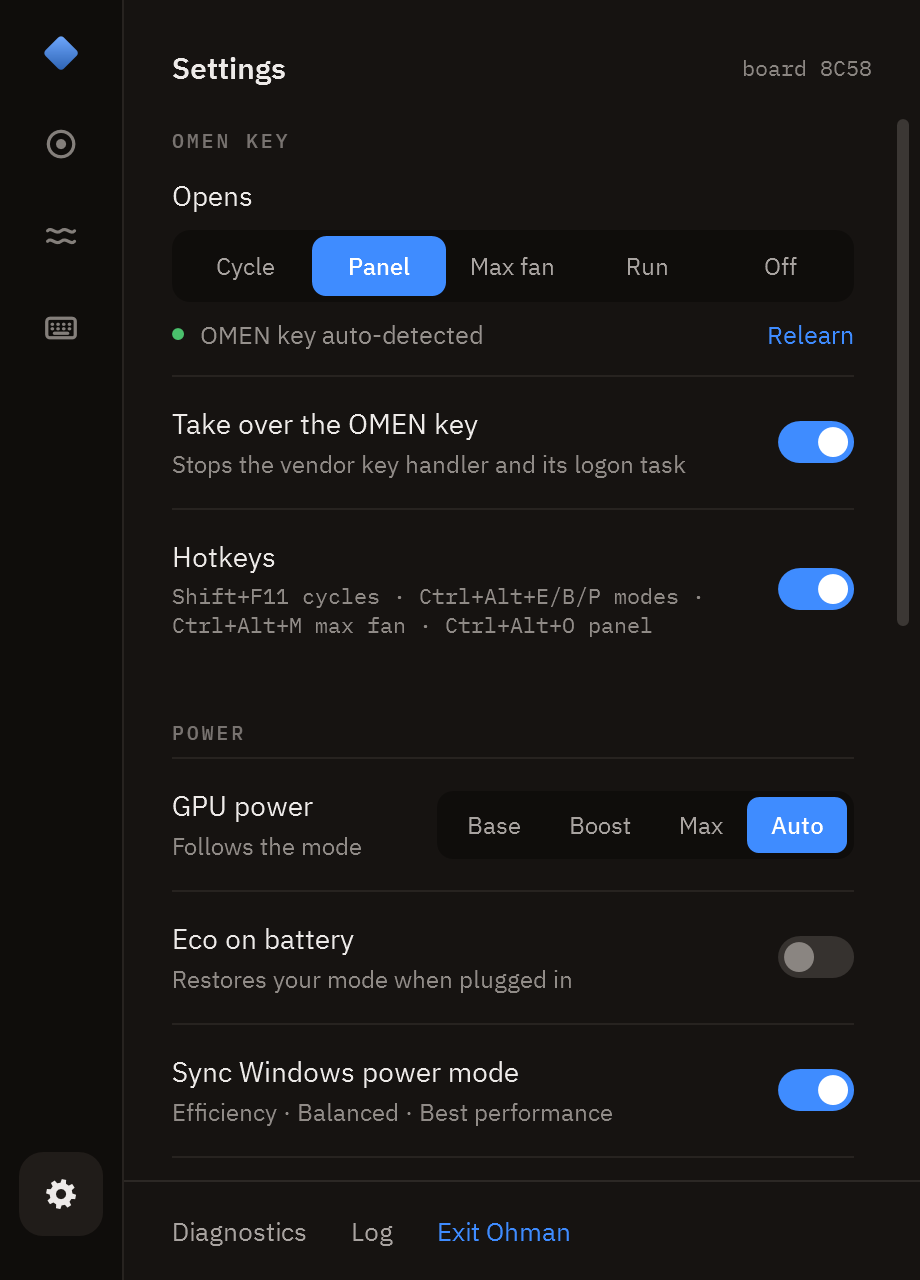
Modes, fan curves, power, graphics switching, keyboard lighting and a game benchmark in one 1.6 MB executable. A replacement for OMEN Gaming Hub & OMEN Light Studio that speaks the same firmware interface, without any ads, services, or accounts.
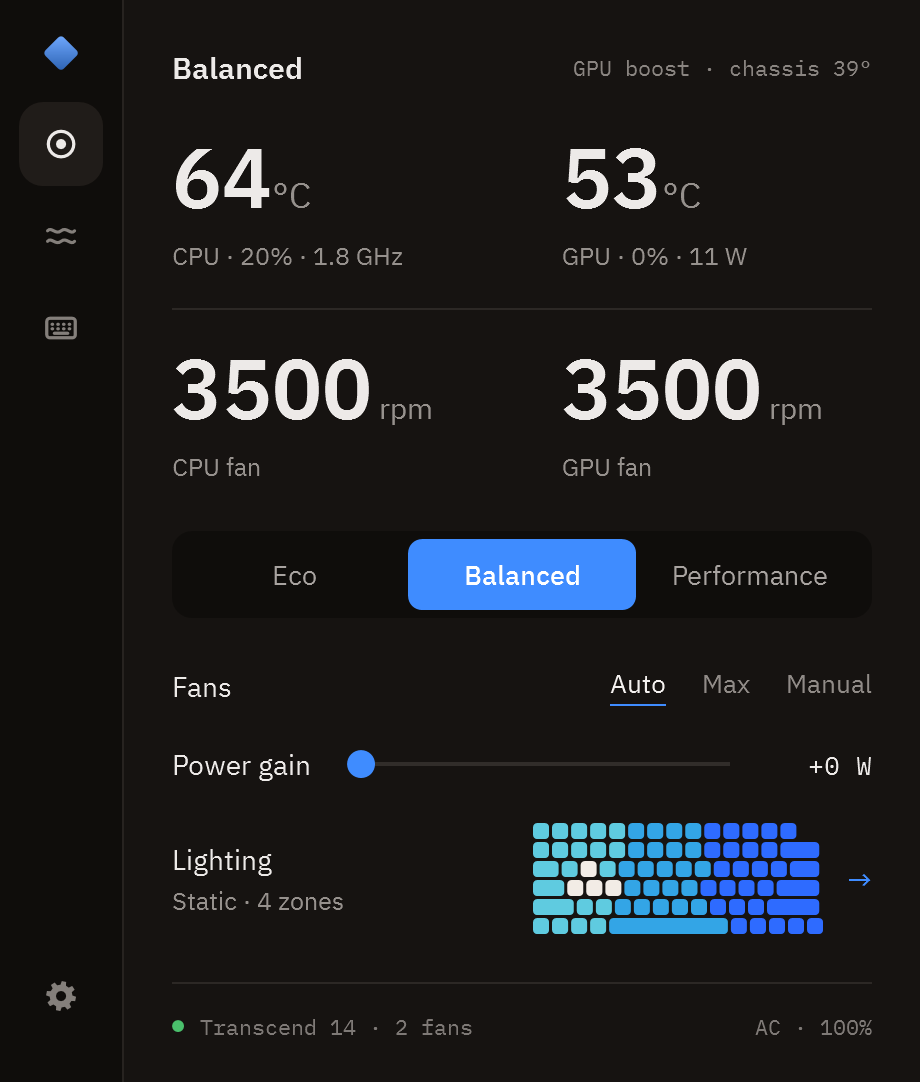
What it does
- Modes
- Eco · Balanced · Performance, one click, the OMEN key, or a hotkey. Each mode remembers its own fans, power gain and GPU choice, and the whole app takes that mode's colour.
- Fan control
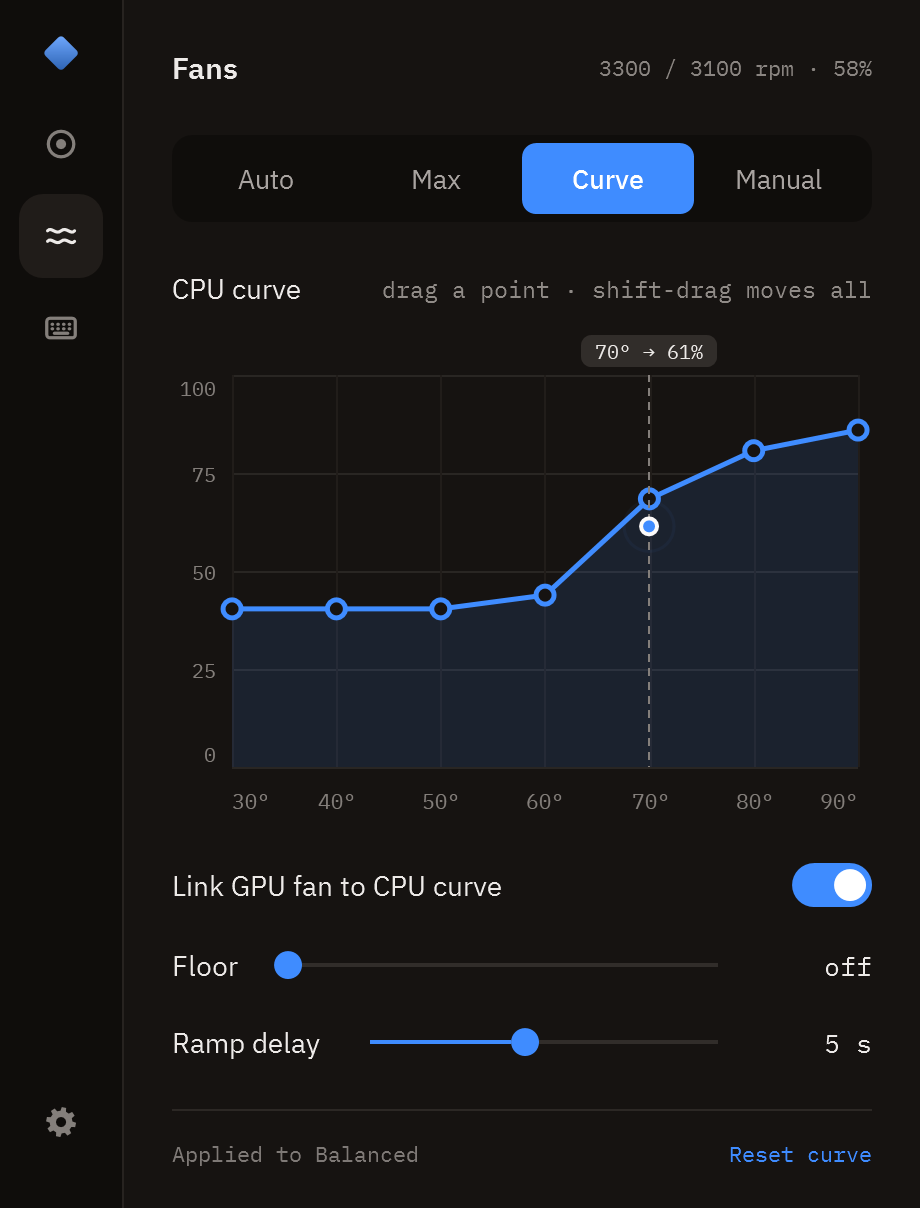
- Auto (this model's own curve), Max, Manual per fan, or your own curve: seven points you drag, a floor, a ramp delay, and a separate GPU curve if you unlink it. The live reading rides the curve so you can see what it is about to do.
- Max fan
- Full speed with a way back: it returns to Auto once the chips are below 60° for two minutes, or after 15, 30 or 60 minutes.
- Power gain
- OGH's "Smart Performance Gain": +0 to +15 W on the CPU+GPU budget that NVIDIA Dynamic Boost draws from.
- GPU power
- Base · Boost · Max, or follow the mode.
- Graphics
- Hybrid, Discrete (the MUX) or iGPU only, whichever your firmware offers. Written the way OGH writes it, with the restart it needs.
- Lighting
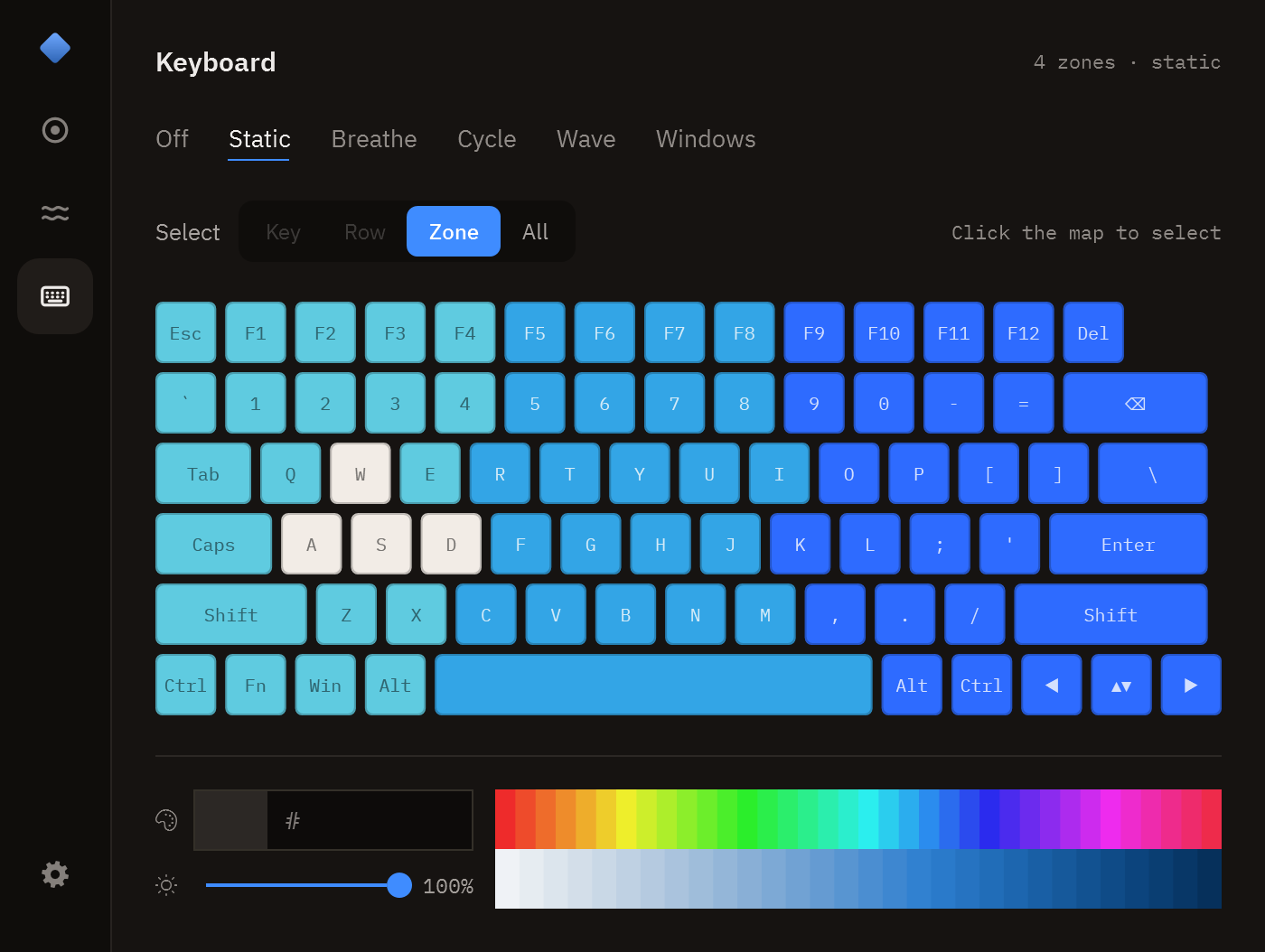
- The keyboard drawn as it actually lights. Pick a key, a row, a zone or the whole board, then a hue and a shade; or Breathe, Cycle, Wave, or hand it to Windows Dynamic Lighting. Per-key selection is there for the boards that have it.
- Display
- Refresh rate, and the lowest rate on battery if you want it.
- Optional driver
- Ohman needs no driver. If you want one, a click in Settings installs PawnIO, open source, signed, and the same driver FanControl and LibreHardwareMonitor install. With it Ohman reads the CPU's own temperature instead of whichever sensor Windows exposes, which is the fix for boards that report a flat 28°, along with the power limits and the reason the chip is holding back. On boards whose firmware refuses fan levels it sets them through the embedded controller instead. Removable from the same row, any time.
- Benchmark
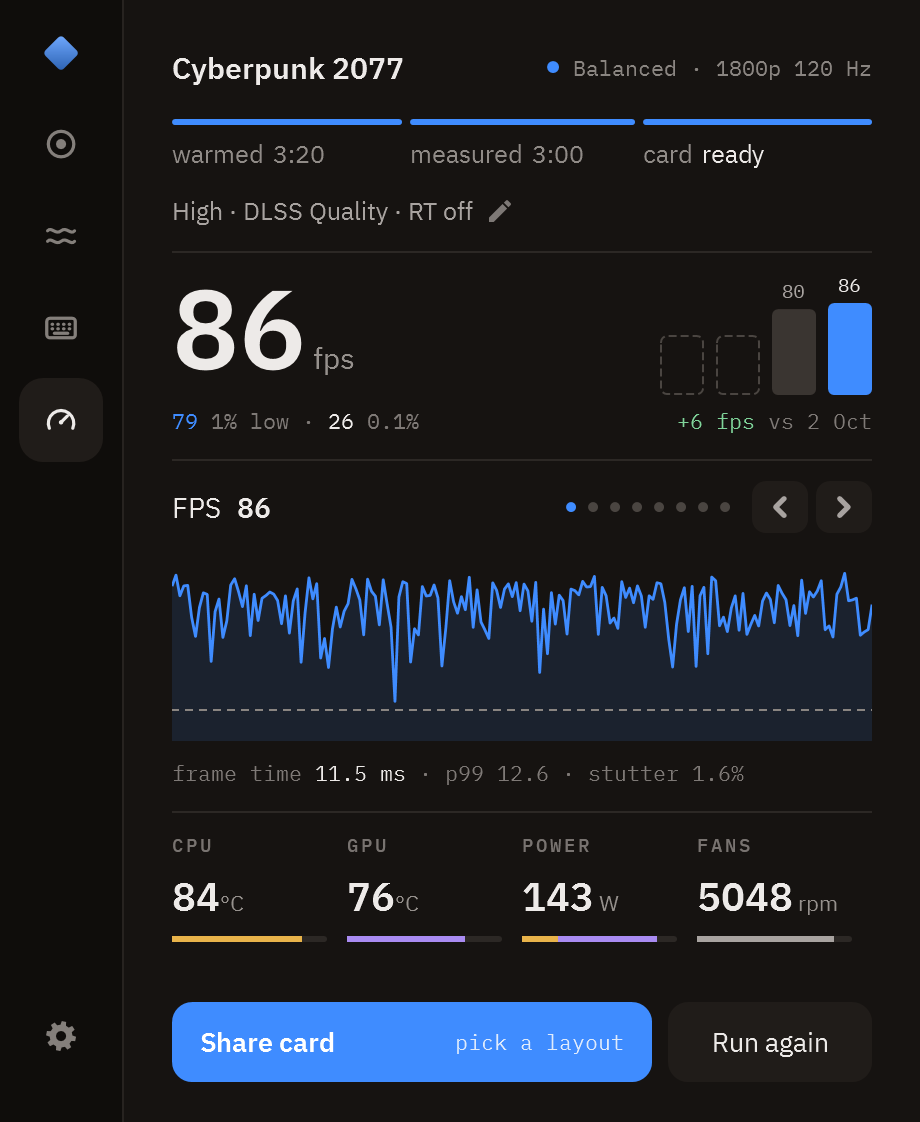
- Ctrl+Alt+R in a game: it warms up, then measures average FPS, 1% and 0.1% lows and stutter, with temperatures, power and fans beside them. Every run is kept and makes a card to share. How it’s measured.
- Live
- CPU and GPU temperature, package watts, fan speeds, load, clocks, chassis sensor, battery. CPU temperature on the tray icon.
- Tray
- Everything above without opening the window: modes, fan mode, power gain, refresh rate, GPU power, graphics, lighting, brightness and every switch.
- OMEN key
- Opens the panel, cycles modes, toggles max fan, or runs a command of your choice. OGH's key handler is stopped, reversibly.
- Safety
- A thermal guard forces max fan on a hot CPU, a hot chassis or stalled fans, and can be switched off. Fan levels between 1 and 1800 rpm are refused, because no fan holds them; 0 is allowed, which stops them.
- Extras
- Starts with Windows without a UAC prompt, Eco on battery, Windows power mode sync, hotkeys, an on-screen flash when a key changes something, and an update check that never installs anything for you.
How it works
HP exposes a BIOS mailbox as the WMI class hpqBIntM. Ohman uses the commands OGH uses: performance mode, max fan, fan levels, CPU+GPU power budget, GPU power, graphics mode, keyboard lighting, plus read-only queries. The OMEN key arrives as a WMI event (hpqBEvnt). Every byte and every measured firmware behaviour is written down in docs/research.md.
- 0x1A mode
- 0x27 max fan
- 0x2E fan levels
- 0x29 power budget
- 0x22 GPU power
- 0x52 graphics mode
- 0x20009 lighting
One executable, with a settings file and a log beside it. To remove it, turn off Start with Windows and Take over the OMEN key first, then delete the folder: those two are the only things Ohman writes outside it, besides the share cards and CSVs you save yourself (Pictures\Ohman, Documents\Ohman).
Supported laptops
Every OMEN and Victus laptop is supported. Ohman asks the firmware what generation it is and drives it accordingly, hiding any control your firmware does not offer.
A green board id has been confirmed by its owner (30 so far).
Every other board still runs, it has just not been
confirmed by a person yet. Help get yours verified.
| Model | Board ids | Status |
|---|---|---|
| OMEN Transcend 14 (2024) | 8C58 | (1/1) Verified |
| OMEN Transcend 14 (2025) | 8E41 | Supported |
| OMEN Transcend 16 (2023–2025) | 8BB3, 8C3B, 8C4D | (1/3) Verified |
| OMEN 16 (2021–2022) | 8A42, 8A43, 8A4C, 8A44, 8A4D | (1/5) Verified |
| OMEN 16 (2023–2025) | 8BA9, 8BAA, 8BAB, 8BCA, 8BCD, 8C76, 8C77, 8C78, 8D24, 8D26, 8D2F, 8E35 | (7/12) Verified |
| OMEN MAX 16 (2025) | 8D41, 8D87, 8D88 | (1/3) Verified |
| OMEN 15 (2019, 15-dc / 15-dh) | 8574, 8600 | Supported |
| OMEN 17 (2019, 17-cb0) | 8603 | Supported |
| OMEN 15 (2020) | 8A15 | Supported |
| OMEN 15 / 17 (2021) | 8BAD | (1/1) Verified |
| OMEN 17 (17-db1xxx) | 8E10 | (1/1) Verified |
| HyperX OMEN 15-gb0xxx (2026) | 8EEC | (1/1) Verified |
| OMEN 15 / 17, 2018–2021 generations | 84DA, 84DB, 84DC, 8572, 8573, 8575, 8601, 8602, 8604, 8605, 8606, 8607, 860A, 8746, 8747, 8748, 8749, 874A, 8786, 8787, 8788, 878A, 878B, 878C, 87B5, 886B, 886C, 88C8, 88CB, 88D1, 88D2, 88F4, 88F5, 88F6, 88F7, 88FD, 88FE, 88FF, 8900, 8901, 8902, 8912, 8917, 8918, 8949, 894A, 89EB | (4/47) Verified |
| Victus 16 (2021–2023) | 88F8, 8A25 | (1/2) Verified |
| Victus 15-fb0xxx | 8A3D | Supported |
| Victus 16-r0xxx | 8BC2 | (1/1) Verified |
| Victus 16 S / R (2023–2024) | 8B2F, 8BBE, 8BD4, 8BD5, 8C99, 8C9C | (3/6) Verified |
Other boards hp-wmi lists as OMEN | 8DD6 | Supported |
| Victus 15 and 16, other models | 88D9, 88DA, 88EE, 8A26, 8A3E, 8A3F, 8BB1, 8C2F, 8C30, 8C3F, 8D07, 8DCD, 8DCF, 8DD0, 8E5C, 8E5E | (7/16) Verified |
Your board id is in Ohman under Settings, or from (Get-CimInstance Win32_BaseBoard).Product in PowerShell. A board that is not in this table still runs, and most of the boards in it have no entry of their own either: Ohman asks the firmware what it is and uses what it answers. The table is a reading aid, not the list of what the code knows.
Verify yours
Try every control Ohman gives you: the modes, the fan modes, power gain, GPU power, graphics switching and the keyboard. If you installed the driver, say whether the CPU temperature looks right and whether the fans still behave. Check nothing is stuck after you exit, then Settings → Report Issue and open a Verify my laptop issue with what it copies.
Five minutes, and everyone on your board gets the tested profile.
If something is wrong on your model
- Settings → Report Issue. Collects your model, board id, BIOS, system-design data and fan table, copies it, and opens a prefilled issue. No personal data.
If Ohman will not start,tools\support-info.cmdwrites the same thing to a file.
If the driver is the part that is wrong,tools\drivertest.cmdsays why in one page. - Paste it in, and say what OGH does differently on your model. OGH's own log helps most, from a session where you clicked every mode:
%LOCALAPPDATA%\Packages\AD2F1837.OMENCommandCenter_v10z8vjag6ke6\LocalCache\Local\HPOMEN\ - A laptop is one entry in src/Platform.cs. Nothing else in the app is model-specific.